什么是 ChatGPT?
ChatGPT 是一款对话式 AI 助手,通过理解自然语言并实时生成类人回复,帮助你思考、写作和解决问题。
ChatGPT 基于大型语言模型构建,能够协助完成广泛的任务。了解更多关于大型语言模型的信息,请参阅什么是 AI。
当你需要快速答案、解释、头脑风暴、改写或简短草稿时,请使用聊天功能。当你希望 ChatGPT 完成一个更大的任务,并生成清晰、可审阅的输出(如简报、分析、演示文稿、电子表格或定期更新)时,请使用工作功能。你可以从简单的聊天开始,当任务需要更多上下文、工具或后续跟进时,再切换到工作模式。
开始你的第一次对话
要开始使用,只需输入一个提示词。提示词是你输入或分享给 ChatGPT 以启动对话的问题或指令。它通常是文本,但也可以是图片、音频或文件。你的提示词会引导模型,使其生成有用的回复。
不知道从哪里开始?复制并粘贴以下提示词,看看 ChatGPT 能为你做什么(将括号中的内容替换为关于你自己的更多信息):
告诉我如何利用 ChatGPT 让生活更轻松。我是一名[你的描述或职业]。给我 5 件我现在可以做的事情,并为每件事提供一个提示词。
阅读回复,然后通过提出后续问题或添加更多细节来优化它。
寻找 ChatGPT 的实用场景
寻找 ChatGPT 实用场景的一个好方法是,从你已经以对话形式完成的工作入手:撰写草稿、头脑风暴想法、总结长内容、将粗略笔记转化为更清晰的信息,或思考问题。这些是很好的早期用例,因为它们易于尝试、风险低且立即可用。如果 ChatGPT 能帮助你更快地写出更好的初稿、整理思路,或减少盯着空白页的时间,这通常是一个强烈信号,表明该任务非常适合。
在此基础上,更强的用例往往是那些频繁重复、涉及多个步骤或需要长期上下文的任务。这时,像项目、自定义 GPT 或技能这样的工具会变得更加有用:它们帮助你整理源材料、保持指令一致,并将一次性提示词转化为可重复的工作流程。一个好的经验法则是从简单的聊天任务开始,留意你重复做的事情,然后为那些你希望更快、更一致或更高质量完成的工作,构建更结构化的设置。
在 ChatGPT 中使用语音
说话通常比打字更快,而聆听可以让交互更自然、更免提。语音功能在忙碌的日子里节省时间,支持无障碍访问,并解锁新的工作流程,比如边走边头脑风暴、多任务处理时起草文档,或大声练习演示。
ChatGPT 中的语音功能允许你直接对 ChatGPT 说话并听到语音回复,或使用听写功能将你的语音转换为文本。使用聊天窗口中的图标,你可以选择语音模式(一种双向对话,你可以实时说话和聆听)或听写模式(说话并看到你的话以文本形式出现,以便进一步修改)。
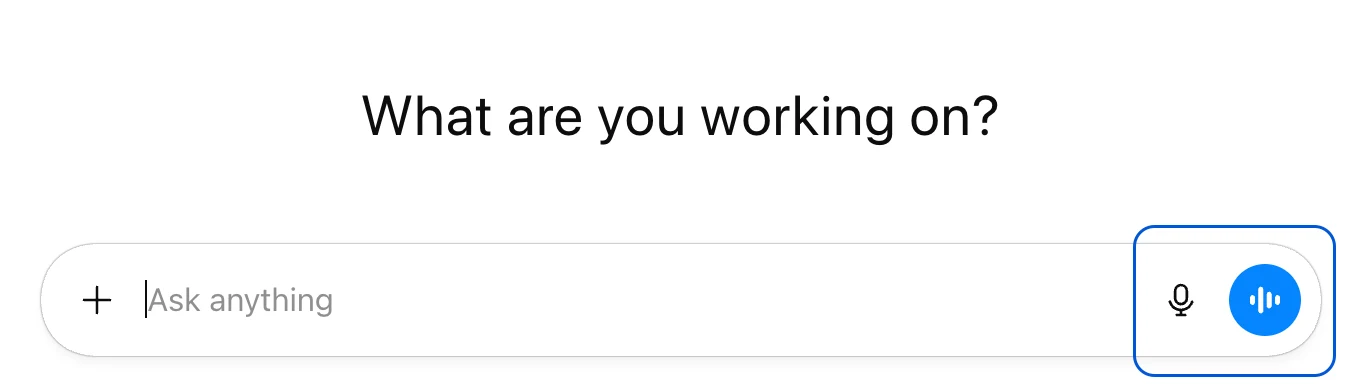
例如,你可以大声提问,ChatGPT 以对话方式回复,或者听写会议笔记以快速生成书面摘要。
来自语音聊天的音频和视频片段会与转录内容一起存储在聊天历史中,只要聊天记录保留在你的历史中,这些内容就会一直保存。
在 OpenAI 帮助中心了解更多信息:
参加课程
参加 AI 基础课程(在新窗口中打开),了解更多关于 AI 的工作原理、它能提供哪些帮助以及如何负责任地使用它。如果你是 ChatGPT 新手,或者希望在探索更高级的工作流程之前打下更坚实的基础,这是一个很好的下一步。
What is ChatGPT?
ChatGPT is a conversational AI assistant that helps you think, write, and solve problems by understanding natural language and generating human-like responses in real time.
ChatGPT is built on large language models, enabling it to assist with a wide range of tasks. Learn more about large language models in What is AI.
Use Chat when you want a quick answer, explanation, brainstorm, rewrite, or short draft. Use Work when you want ChatGPT to complete a larger task with a clear, reviewable output, like a brief, analysis, deck, spreadsheet, or recurring update. You can start simple in Chat, then move to Work when the task needs more context, tools, or follow-through.
Start your first conversation
To get started, simply enter a prompt. A prompt is the question or instruction you type or share with ChatGPT to start a conversation. It is usually text, but it can also be an image, audio, file. Your prompt guides the model so it can generate a helpful reply.
Not sure where to begin? Copy and paste this prompt to see what ChatGPT can do for you (replace the brackets with more information about yourself):
Tell me how I can use ChatGPT to make my life easier. I’m a [description of you or your job]. Give me 5 things I can do right now, and a prompt for each one.
Read the response, then refine it by asking follow-up questions or adding more detail.
Finding good use cases for ChatGPT
A good way to find useful ChatGPT use cases is to start with work you already do in chat form: writing a draft, brainstorming ideas, summarizing something long, turning rough notes into a clearer message, or thinking through a problem. These are good early use cases because they are easy to try, low risk, and immediately useful. If ChatGPT helps you get to a better first draft faster, organize your thinking, or reduce time spent staring at a blank page, that is usually a strong signal that the task is a good fit.
From there, stronger use cases tend to be the ones that repeat often, involve multiple steps, or need context over time. That is where tools like Projects, custom GPTs, or Skills become more useful: they help you organize source materials, keep instructions consistent, and turn one-off prompts into repeatable workflows. A good rule of thumb is to start with simple chat tasks, notice what you do more than once, and then build toward more structured setups for work you want to do faster, more consistently, or at a higher quality.
Use voice in ChatGPT
Speaking is often faster than typing, and listening can make interactions more natural and hands‑free. Voice features save time during busy days, support accessibility, and unlock new workflows like brainstorming on the go, drafting documents while multitasking, or practicing presentations aloud.
Voice in ChatGPT allows you to speak directly to ChatGPT and hear responses out loud, or use dictation to convert your spoken words into text. Using the icons on your chat window, you can choose between Voice Mode (a two‑way conversation where you talk and listen in real time) or Dictation (speak and see your words appear as text for further refinement).
For example, you might ask a question aloud and ChatGPT responds conversationally, or dictate meeting notes to quickly generate a written summary.
Audio and video clips from your voice chats are stored alongside the transcription in your chat history and are retained as long as the chat remains in your history.
Learn more in the OpenAI Help Center:
Voice Mode FAQ(opens in a new window)
Take the course
Take the AI Foundations course(opens in a new window) to learn more about how AI works, where it can help, and how to use it responsibly. It’s a good next step if you’re new to ChatGPT or want a stronger grounding before exploring more advanced workflows.
本文内容采集自官方网站,排版和翻译可能与原页面存在差异。
阅读官方全文